Showing posts with label newbie. Show all posts

Monday, February 18, 2008

ECS Sim

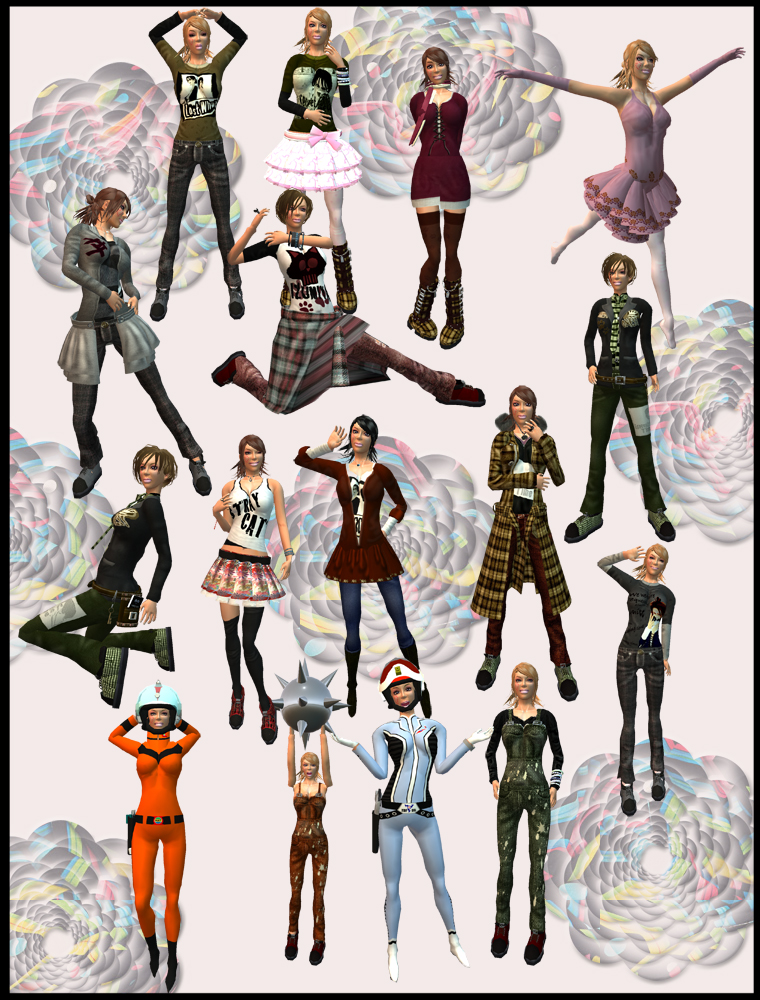
I first stumbled upon this sim searching for the much blogged about 69 (shoe, hat, and accessories store). Although some of the areas still look like they are being developed most appear to be finished and ready for business. If you're strapped for time I'll suggest two main areas that need to be checked out, but really you could spend the better part of a day seeing everything that there is here. First, I'll suggest the ECS Katurin Park (http://slurl.com/secondlife/ECS/86/14/22) a free market (no not freebie - free as in non-discriminatory free trading) that houses several merchants. Many of the merchants have put up free items. You'll find the bulk of the items located in the four corners of the market: complete outfits for both males & females, hair, jewelry, and tons of novelties all $0.

ECS Katurin Park

Wow, that was a lot of stuff. All the outfits and hair are from ECS. I did use the valentine skin and unisex hair from another part of the sim. If you want the skin or unisex hair look at the list of free items that will be at the end of this entry. (larger photo here)

The second place I'd suggest you check out if you're pressed for time is another of the larger shopping areas on the ECS shopping mall (http://slurl.com/secondlife/ECS/206/156/21) which like the Katurin Park also offers a lot of goodies for both the female and male avatar especially any avatar 60 days or younger. Yes, you have to be a new player to get some of the items, but since I'm not new I can't show you any of those items. What I can show you is:

ECS Shopping Mall

Now guys, you have to admit that coat is pretty darn cool and the hat with hair is unisex both can be found on the second floor. The dress near the entrance on the first.

I know I suggest if you're strapped for time that you check out the two areas above, but keep in mind there is a lot here to see. You'll want to check out this sim really well because almost all vendors offer something for free. And almost all of the vendors are offering great prices for their items especially in the open market and the small vendor carts located here. Following is a list of the freebies on the island (these may change so it's all in your best interest to explore):

Endeavor (ECS 243, 177, 22)
Eyes, Bag, and 2 Belts $0

PISA (ECS 205, 196, 32)
Ruby & Diamond Bracelet $0

ECS Rentalcycle (ECS 152, 99, 22)
Free Bicycle $0

Azul (ECS 155, 72, 22)
3 female shirts, 2 male $0

Sakura Original (ECS 159, 52, 22)
2 shirts $0

Tsubaki Original (ECS 161, 47, 22)
5 (3 boxes) novelty dolls $0

Bell Equipe (ECS 157, 28, 22)
Keyboard object $0

Book Store (ECS 154, 12, 22)
3 books, 1 tshirt $0

69 (ECS 81, 48, 23)
Succubus Hat $1

La Petite Fleur (ECS 21,111,22)
2 skirts $0

Star Hitters (ECS 21, 106, 22)
Chair & Dress $0

NexR Jewell Collection ($7 skins) (ECS 21, 102, 22) Valentine Skin $1 (Skin used in photos)

W-Zero3 (ECS 22,92,22)
Everything $0 on the cart (gadgets, chairs, hat w/hair unisex)

Lucky Card (ECS 22,86,22)
m- Cannon Hair $0

Apple Pop (ECS 21, 83, 22)
Cat hat & hat for tinies $0

Ron (ECS 21, 78, 22)
Bag $0

Putti Tiny (ECS 21, 71, 22)
Tiny Headphones $0

Leisurely (ECS 21, 66,22)
Bracelet, f- hair $0 Choker $1

Ryouta Works (ECS 22, 61, 22)
AFK tool $0

Milky-way (ECS 21, 57, 22)
Unisex Muffler $0

Me Skin & (upstairs) Kyoko's Hair (ECS 56, 82, 26) Turtleneck, skin & shape for 30 days or younger f-player, floating room, face lamp, unisex hair $0-10 (Unisex hair in first photo)

A's Motors (ECS 39,106, 23)
Tshirt $0

Moon's Dream (ECS 22, 124, 22)
Free Kitty Paw Collar $0

Nanao Loon's Cart (ECS 21, 129, 22)
Bejeweled belt $0

honepoki Aya's Cart (ECS 21, 133, 22)
Muffler pet $0

Pz (ESCS 21, 138, 22)
Face Light Set $0

Mauve (ECS 21, 148, 22)
Gift $0

Flower Stall (ECS 21, 161, 22)
2- (m) Watches, 2- (f) hair with flowers, Broom $0

Soul * Flower (ECS 22, 165, 22)
String lights $0

Yairi Akina's Shop (ECS 53, 152, 25)
5- tiny bear avatars $0

Friday, January 4, 2008

The Inventory Done Hit the Fan, Ya'll!

It seems that a few of ya'll are feeling the Christmas bloat and need some advice on how to shed the excess inventory. So here's my suggestions: (Keep in mind they are suggestions and you can ignore them. =D )

ORGANIZE! Yep, it takes time. It sucks. Get over it and do it!

My suggestions for the Girls are: Find your 'Clothing' folder> right click> new folder ... create the following new folders: shirts (inside this folder make: short sleeve, no sleeve- for tanks and corsets, long sleeve, and tshirts then you can further subdivide by colors) , pants (long, capri, and shorts then sort by color), Long dresses (divide into casual and formal and then by color), short dresses (divide into casual and formal then by color), Pants outfits (inside this one make 3 folders Winter, Summer, and Short sets. You can further sort by Casual and Formal and then finally by color), Skirts(long, medium, and short then by formal-casual and further divide by color), *if* you're like me you'll also need a folder for costumes and finally accessories (Jewelry, Shoes, and Random or whatever you seem to have a lot of belts, hats, etc. could be a main folder inside your accessories folder.)

What does my clothing folder look like when opened? Well the first thing you see are a series of numbered folders:
  1. Accessories [1. Jewelry (sorted by 1. Designer 2. Color, 3. Gold 4. Silver - further sorted within each folder by designer if a set or necklace, earring, bracelet, ring folders if picked up seperate), 2. Shoes (sorted by color then heel, boot, flat, casual), 3. Random (1. Hats, 2. Belts, 3. Purses, 4. Fans 5. Boas 6. Food 7.Flowers, etc... )
  2. Long Dresses [Casual, Formal - then sorted by color]
  3. Prim and Proper [1. Accessories (hair, gloves, shoes, dance card), 2. Period (then by color), 3. Lady like, 4. Free Women)
  4. Casual & Short Dresses [Casual, Formal - then sorted by color]
  5. Kimono's & Asian Outfits [1. Accessories {Avatars (skins & shapes), Hair, Shoes, Fans, Umbrellas, Random}, 2. Cheongsam Dresses (color), 3. Kimonos {Formal, Casual (color)}, 4. Saris (color), 5. Vlintuitions]
  6. Goth clothing [1. Accesories {Body (hair, skin,) Shoes, Dolls, Gloves, Jewelry, Hats, Stockings, Corsets) 2. Lolli {!Accesories (hair, dolls, shoes, jewelry, purses) and dress folders), 3. Pants sets, 4. Dresses (Long, Short) 5. Skirts, 6. Shirts (tanks, short sleeve, long sleeve)
  7. Pants/Short outfits [1. Pants (jeans, slacks), 2. Capris, 3. Shorts]
  8. Costumes [sorted by type ex. - animals (neko, tinnies, bears, anthropomorphic), bugs (butterflies, wasps, bee, ladybug), fantasy (elf, dwarf, fae, drow, hobbit, druid), homeless, cowboy, etc...)]
  9. Lingerie [sorted by type: Bras, Panties, Silks, Corsets, Nighties, etc.. Then by color]
  10. Seasonal [This folder is packed and saved at the end of a holiday. It's now empty, but during Christmas it was full.
  11. Not sorted yet [These are clothes that need to be paired with hair, shoes, and jewelry before being put into the appropriate folder or DELETED.]
You can see that over time I've focused in on a couple of looks rather than just general clothing item folders.

For organization of body parts please look at the guy's #2 suggestion and feel free to substitute a fingernail/toenail folder for the mustache/goatee folder.
Tusk_1
(Dress from the Free Ring, Hat from Illusions $1 box, Hair from HCT the style worn is discontinued, but there is a similiar one for $100)

For the Guys organization is much simpler. This is exactly how I organized my husbands and it really hasn't changed since he's started, then again he doesn't get sl.

1. Find your 'Clothing' folder> right click> new folder ... create the following new folders: shirts, pants, suits, outfits, and Accessories (shoes, jewelry, hats, ties, and weapons folders in accessories)

2. Find your 'Body' folder> right click> new folder... create the following new folders: skin, shape, hair, mustache/goatee, & eyes

Get an inventory organizer.


Oh, and don't forget to use it. ;) This is a really simple tool to use especially if everything in whatever folder you want to save is no copy. Oh boy, does that help!
  1. All you need to do is make a prim on the ground> press the more button in the bottom right corner of the edit menu> Name the prim on the general tab> click the contents tab and then drag and drop each item into your prim waiting for it to show in the contents tab.
  2. *If everything you saved was no copy it has been removed from your inventory and is now safely inside a prim and you can go to step 3, but if no transfer boogers were in your folder you'll have to delete these items as not to have duplicates nesting inside the inventory you carry around with you.
  3. Take the prim you created into your inventory
  4. Move your prim from the objects tab of your inventory into your inventory organizer
  5. If there were no transfer items in your folder now is the time to delete them from your inventory.
An Inventory Organizer can be as simple as a self created prim, a piece of art, a rug, or something as elaborate as the many inventory organizers out there that have floating text and scroll buttons. I don't suggest that you carry your organizer around with you *unless* you're doing this because you have no other place to put it.

Tusk_5_I didn't do it!
( Sorry just a funny pic. Location: Tusk Sim, Skin: Tuli, Hair: HAIRAPY - Coeur, Necklace: Pixel Dolls (free), Earrings: MIA sim freebie store, Bracelet: Woo's, Dress: Prim Princess (lucky chair), Shoes: Absentia )

Full permissions items can be saved onto a notecard.

Yep, that's right if you've made some things and want to organize them nice and tidy- slip them into a notecard. Got tons of textures and want to organize, but haven't picked up a texture organizer *notecard* them. Went crazy at a freebie place or bought a business in a box item feel free to put those items inside a notecard. Oh, and when you have a lot of notecards: box them and put them into your inventory organizer! And don't forget you can put notecards inside of notecards and rez the items whenever you need them.

Tusk_6_ Caribbean Dream
(Location: Tusk Sim, Skin: Tuli _ []::Tuli::[] S4 sunkissed brown brows ~ rosy lips/smokey blue_ group gift $0, Hair: Bewitched _ Milano (mens) - babypink _ secret sale $1, Jewelry: Talisman _ Sara Pendant Necklace _ group gift $0, Flowers: Body Politic _ Drifting Sands Spring Fling Freebie Morning Medley $0, Dress: Sexy in Pink _ **SIP** Tropical Formal _ was free when store opened $0)


Delete, delete, delete....

Don't be afraid of deleting something *especially* if it was a freebie. There will always be another one, and it may even be better. It's easy, it's simple, and it's fun to watch your inventory go down (even though the count isn't accurate.). No transfer items are particularly my peeve. I think of them as through aways and never spend more than $50 on any one item/outfit, because I know it's just so much easier to delete than to pack. (but, that's just my opinion many people love duplicating things over and over in their inventory)

But, if you were wise and bought no copy/transferable items then you have a couple other options: yard sale the item, go to a swap party (not wife swap, but clothes swap), transfer it to an alt/holding acount, or my personal favorite -thrift it- go to help island or the welcome area and give the dress/hair/shoes/etc. to a new person and if all else fails you can still delete, delete, delete and empty the trash.

Ok, so you may be asking why am I doing all of this? Well there's a simple reason ...

Your inventory should have no more than 20,000 items.

Where did I get this number from? Well a while back Hazle Kyrgyz had an inventory issue and wrote about it on the Talisman Designs blog. Which in turn lead to someone posting a comment linking to Boneflower's blog where Zoe Llewelyn discussed her inventory losses and wouldn't you know it a linden (kona linden) actually commented:

- You should never have more than 15-20k of objects in your inventory. The more objects you have, the slower it will be for you log into SL...even to the point where you will no longer be able to log into SL because you have too large of an inventory. Remember, data is data (which Linden Lab owns...you merely own IP rights). This is clearly detailed in TOS. Data can become corrupted, pending on several factors regarding one's client (your hardware) and server side (Linden Lab servers). Should your data get corrupted for whatever reason (ie. poor connectivity, server crash...etc), there is no guarantee we'll be able to recover the data. Because the amounts of data our systems manage, we clearly state in TOS that no data is guaranteed and should be treated as so.
Uhm yeah, we get it Linden's don't want the responsibility of securing digital information and we must be tidy little children and pick up, pack up, and pay for an alt. So, you heard the linden go clean up your inventory!


Thursday, November 15, 2007

The *New* Orientation Station

So, does anyone know what's up with the new orientation stations??? Boy, have they changed!

There's one for a couple of movies coming out:
#1 Beowulf:

BeowulfIsland

You'll find shirts and pants for both male and female avatars. And also a Beowulf avatar for guys.

#2 I AM LEGEND!!! This orientation center is great! (And the best thing about it is ZOMBIES! Ok, ok they call them infected, but whatever. We all know they are ZOMBIES.)

IAL Orientation Island

If you're not new and going to check out an orientation center; this is the one! If you go through the complete orientation from the beginning you'll be pleasantly surprised.

There is a unisex outfit which includes prim shoes! And not only is there a white skin, but also a black skin. Yay! Someone noticed ethnic diversity. These skins are nice, too!

Ok, so you skipped the orientation bit, because you're not new. I can understand, but you still won't be left out. There are 4 uninfected humans and a police dog avatar. Or if you decide to be an infected you can choose from an infected skin or an infected dog avatar. Yay, Zombies!

And, there's more *if you want to join the fun you can play either an infected/uninfected on the adjoining sims. Just pick up the hud (and weapons if you're uninfected) and follow the arrows over the bridge.

Ok, so you're cup of tea isn't movies. How about TV CSI:NY has an orientation station.... ok, I won't go on about this one. Here's the pic:

CSINY

Well, there's the pic of the last board I touched. I completed the orientation station and all I got was a lousy badge. LOL (If you do happen to wander down to Fashion Avenue you'll have better luck finding clothes. A male and female outfit should have been closer to the orientation point, guys.)

Showtime's L-word also has an orientation station

L Word Orientation

You'll find skins, prim shoes, clothes, and the first appearance of a flexi dress here!

What about sports? Well, the NBA has a really great orientation station with the most diverse group of human avatars I've seen yet. And I have to say this group is the best looking, too!

NBA Orientation

Aren't they all great? Flexi hair, pants, t-shirts, and prim shoes; oh my!

Now, there are tons more *new* orientation stations out there. All you need to do is open up your search window and search for orientation. =)